
How to Build an Ecommerce Knowledge Base That Actually Works (2026)

Executive Summary
- An ecommerce knowledge base is a set of help articles and FAQs that lets customers answer their own questions about orders, shipping, returns and products.
- The best ones are built from your real support tickets, not guesses. Start with the five to ten questions you get most.
- Keep answers short, specific and easy to scan, and link to them from product pages, order emails and live chat so customers see them before they contact you.
- Review it every month. Track what people search for, which articles get read, and whether tickets on those topics go down.
A while back we audited a Shopify store with a really gorgeous FAQ page. Nice fonts, cute little icons, the whole thing. Forty questions on it. And the store was still drowning in “where’s my order” and “can I return this” emails, hundreds a week.
Once we actually sat down and read the FAQ, it was pretty clear what was going on. About half of it was stuff nobody ever asks. “What’s our brand story?” “Are we on Instagram?” Meanwhile the questions clogging up the inbox were either missing completely or buried under a wall of fluffy text.
Honestly, that’s where most stores go wrong. They write the FAQ they assume customers need, not the one customers are very obviously asking for every day. So let’s sort that out.
What Is an Ecommerce Knowledge Base?
Think of it as the self-help corner of your store. Some brands call it a help center, others just call it the FAQ, and some have both. Either way, it’s a bunch of short, clear answers to the stuff people wonder about before and after they buy. How long will shipping take? How do I send something back? Which size do I need? Can I change my order?
When it’s done well, it quietly does two jobs. It helps shoppers make a decision faster, which is good for sales. And it keeps a big pile of repeat questions out of your inbox, which gives your team hours back every week.
Why Most Shopify FAQ Pages Don’t Work
In our experience it nearly always boils down to three things.
First, the questions are off. Someone guessed what customers might ask instead of looking at actual tickets, so the important stuff never made it onto the page.
Second, the answers are mushy. “Shipping times vary” tells nobody anything. “Most US orders arrive in 3 to 5 business days” actually helps.
And third, nobody can find the thing. It’s sitting behind a tiny footer link, never mentioned on product pages, in emails or in chat. So people just email you. Can you blame them?
Get those three right and you’re honestly most of the way there.
Step 1: Start With Your Real Tickets
Before writing anything, open up your helpdesk and see what people are really asking. If your tickets are already tagged, great, sort by tag and count them up. If not, just read through your last couple hundred and scribble down what each one’s about.
A pattern shows up fast. For most Shopify stores the top of the list ends up looking pretty similar: tracking and order status, shipping times and costs, returns and exchanges, changing or cancelling orders, sizing and product details, and discount codes. Your mix will be a little different from the next store’s, and that’s kind of the whole point. Your knowledge base should be built around your list, not one you copied from somewhere.
Grab the top ten. That’s version one. You can always add to it later.
Step 2: Group Questions Into Simple Categories
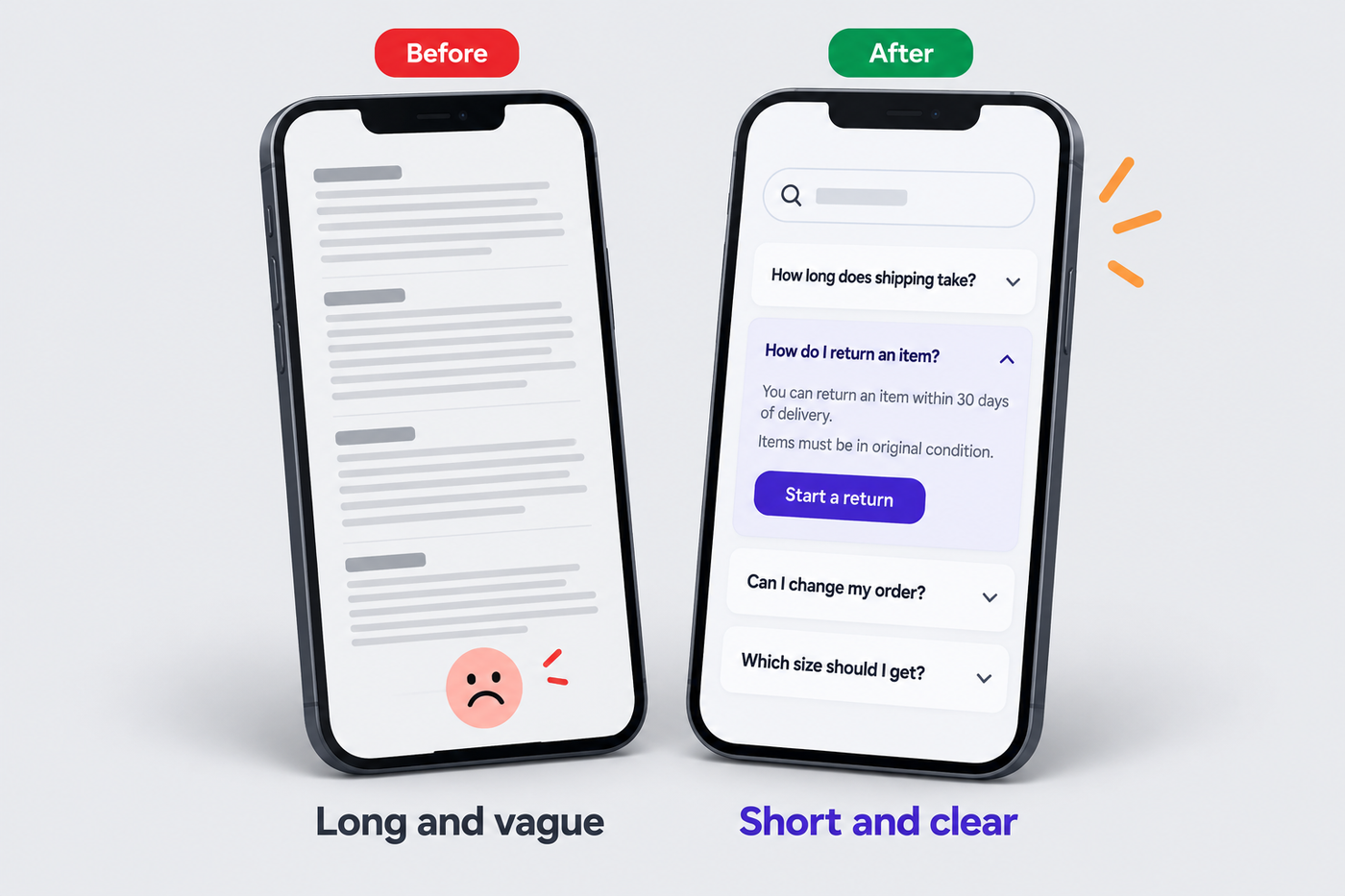
Nobody enjoys scrolling through 40 questions stacked in a single list. Pop them into a few clear groups so people can jump straight to what they need.
Five or six groups is usually plenty. Something like Orders, Shipping and Delivery, Returns and Exchanges, Products and Sizing, Payments and Discounts, plus Account or Subscriptions if that applies to you. And use the words your customers use. “Returns” will beat “Post-Purchase Experience” every time.
Step 3: Write Answers People Can Actually Use
This is where a lot of FAQ pages lose people, and a few small habits fix most of it.
Answer the question straight away, in the very first sentence. If the question is “how long does shipping take?”, the first thing they read should be the number of days. Not a paragraph about how much you care about fast delivery.
Be specific, too. Real numbers, real dates, real steps. “You can return items within 30 days of delivery” is helpful. “We offer a flexible return policy” really isn’t.
Keep it short. Most answers only need two to five sentences, and if one needs more than that, break it into steps.
Point them to the next thing they’ll need. If the answer is “you can start a return here,” put the link right there. Same with tracking.
And please, write it like a human. Your help center should sound like your brand talking, not like your terms and conditions.
Shopify FAQ Best Practices for Where It Lives
Good answers are only half the job. The other half is getting them in front of people at the moment they need them.
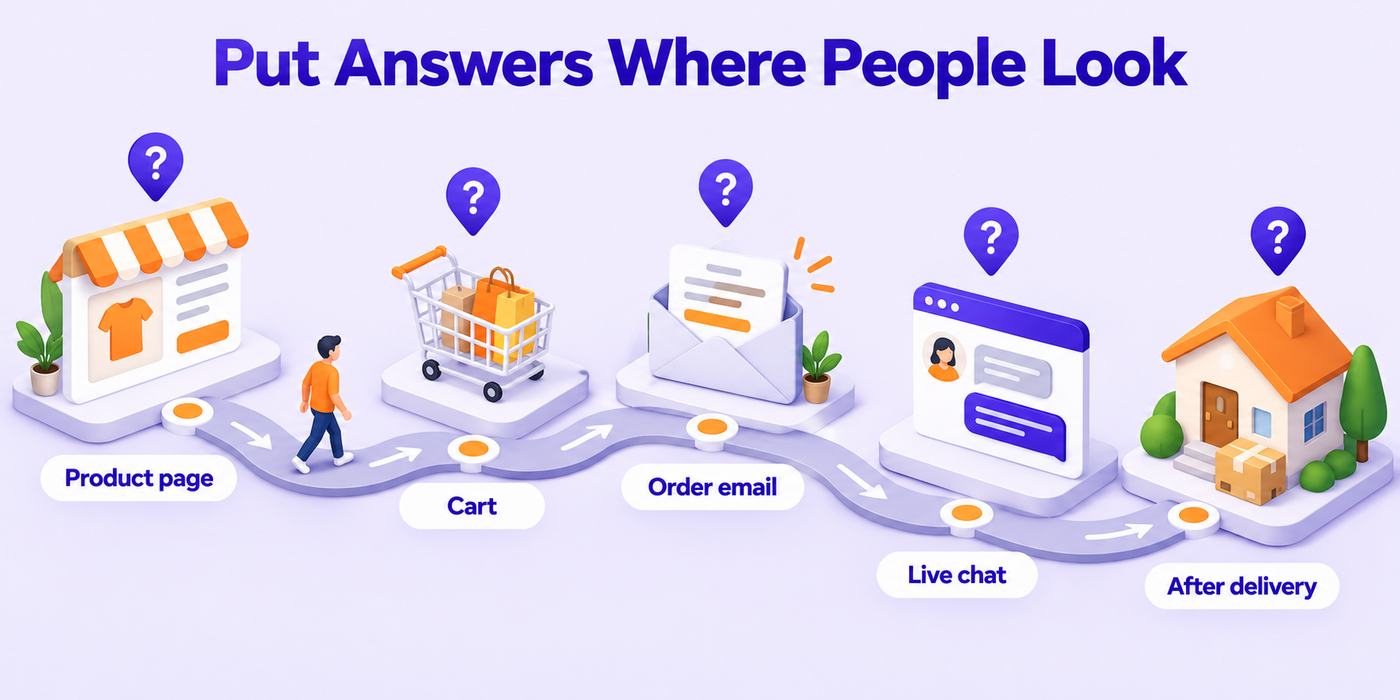
The most important ones should be right on your product pages. Shipping time, the return window and a link to the size guide belong next to the “Add to cart” button, so nobody has to leave the page to find out.
Put a “Help” link up in your header, not just the footer. You’d be amazed how much more it gets clicked up there.
Your order emails are another great spot. The confirmation and shipping emails are perfect for little lines like “Need to change something? Here’s how” or “Here’s how returns work.”
Hook it into live chat as well. Lots of chat tools can suggest an article while someone’s still typing, and your team can just paste a link instead of writing the same answer again. If you’re getting chat set up, our guide to ecommerce live chat for Black Friday walks through it.
Once you’ve got more than fifteen or so articles, add a search bar. People would much rather type “return” than scroll.
How to Create a Shopify Help Center
There are a few ways to go, depending on how big you are.
If you’re on the smaller side, a well-organized FAQ page right in Shopify is often all you need. Most themes have collapsible sections, so each question opens when someone clicks it. Group it by category and link to it from the places we just talked about.
As you grow, a proper help center starts to make more sense. Helpdesks like Gorgias and Zendesk come with their own help center builders that plug into your support inbox, so you can see which articles people read and which questions still end up as tickets. There are also Shopify apps that do just help centers, if you want something in between.
Whichever route you pick, the steps don’t really change. Set up your categories, write your top ten, link them from product pages, emails and chat, and check in on it regularly. Or, if you’d rather hand it off, our knowledge base and FAQ team builds help centers for Shopify brands straight from their actual ticket data.
Don’t Forget the Holiday Season
Every year, your knowledge base needs a quick tune-up before Black Friday. Add your holiday shipping cut-offs, any longer return window you’re offering on gifts, and clear answers on how the sale discounts work. Stick those at the top while the sale’s running.
It’s one of the cheapest ways we know to keep holiday tickets from getting out of hand. There’s a ready-to-use template in our post on holiday return policies for Shopify you can drop straight in.
Keep It Fresh: Review Every Month
This isn’t something you set up once and forget about. Policies change, products change, and new questions creep in.
Once a month, take a quick look at a few things. What are people searching for in your help center, and especially, what are they searching for that comes back empty? Which articles get read the most? And which ticket topics keep showing up even though you’ve got an article for them? That last one usually means the article’s not clear enough, or it isn’t linked where people actually need it.
Then tweak, rewrite or add articles based on what you find. Fifteen minutes a month tends to be enough to keep things in decent shape.
How to Tell If Your Knowledge Base Is Working
The easiest tell is simply fewer repeat tickets. Pick your three biggest ticket topics, write down how many you’re getting now, and check again a month after the new knowledge base goes live.
If your tool lets you, you can also compare how many people read help articles against how many reach out to support, and see whether people mark articles as helpful. Over time you’re hoping more folks find answers on their own and fewer ask the same thing twice. It pairs nicely with the ideas in our guide to ecommerce customer service automation.
Frequently Asked Questions
What is an ecommerce knowledge base?
It’s the collection of help articles and FAQs on your store that covers the common stuff, orders, shipping, returns, products and payments, so customers can sort things out themselves.
What should a Shopify FAQ page include?
Whatever you get asked most in your inbox. For most stores that’s order tracking, shipping times, returns and exchanges, order changes, sizing and discount codes.
How many questions should an FAQ page have?
Start with your top ten real ones. Then add more over time, based on what people search for and what keeps landing in your inbox.
How do I create a help center on Shopify?
If you’re small, a tidy FAQ page with collapsible sections does the trick. Bigger stores often use the help center built into their helpdesk, like Gorgias or Zendesk, or a dedicated Shopify help center app.
Where should I put my FAQ on my store?
Link it from your header, product pages, order emails and live chat. And put the really important answers, like shipping and returns, right on the product pages.
How often should I update my knowledge base?
A quick look every month, and a proper refresh before big sales like Black Friday.
Build a Knowledge Base That Pulls Its Weight
A good knowledge base just keeps working in the background, answering questions at 2 a.m. and keeping your inbox a whole lot calmer. All it needs is the right questions, answered in plain words, in the places people actually look.
Want some help building yours from your real ticket data? Have a look at our knowledge base and FAQ service, start with a 15-day free pilot, or just message us on WhatsApp.
Recommended for you
Live Chat for Ecommerce: Setup, Staffing and Metrics for Shopify Stores (2026)

Ecommerce Return Solutions: 7 Ways to Cut Return Costs in 2026

Agentic Commerce Optimization for Shopify: How to Get Your Products Chosen by AI Shopping Agents (2026)