
Ecommerce Live Chat Support: How Shopify Stores Turn Black Friday Chats Into Sales (2026)

A shopper with a question and no one to answer it usually just closes the tab. Here’s how Shopify stores set up ecommerce live chat for Black Friday, what to automate, what to keep human, and the scripts that turn quick chats into orders.
It’s 10:40 on Black Friday night. Somebody in Chicago has a jacket sitting in their cart, and they can’t decide between a medium and a large. They poke at your size chart for a bit. It doesn’t really help. So they look around for someone to ask.
Now, if there’s a little chat bubble and a real reply shows up within a minute, odds are pretty good that jacket gets bought. If what they find is a contact form promising a reply “within 24 hours”? Tab closed. They’ll grab a jacket from someone else before bed.
Honestly, that one scene is the whole argument for live chat. It reaches people right at the second they’re making up their mind. Multiply that by a few hundred shoppers over the biggest sales weekend of the year and it starts to matter a lot.
So here’s how we’d get ecommerce live chat ready for Black Friday, in a way that actually brings in orders and doesn’t flatten your team in the process.
What Is Ecommerce Live Chat?
You’ve seen it a thousand times. That small chat window, usually tucked in the bottom right corner of a store, where you type a question and somebody answers on the spot. Sometimes that somebody is a person. Sometimes it’s a bot. These days it’s usually a bit of both.
What makes it different from email is when it happens. Email tends to be cleanup, sorting out a problem after someone’s already bought. Live chat customer service happens while they’re still browsing. Which means one good answer can go straight into a checkout.
Why Live Chat Matters So Much on Black Friday
Think about how people shop that weekend. Twelve tabs open. A deal on one site ending at midnight, another ending at noon. Zero patience for anything that makes them stop and wonder.
And the stuff they type into chat is almost always the kind of question that decides the sale. Does this run small? Will it get here before Christmas? Why won’t my code work? Can I stack two discounts? Is this the same one you sold last year?
Get back to them fast and that cart usually turns into an order. Leave them waiting, and you’ve more or less paid for an ad click that walked right back out the door.
There’s a nice side effect, too. Every question that gets sorted in chat on Friday is one fewer email sitting in your inbox on Monday morning.
Live Chat vs Email vs Chatbot
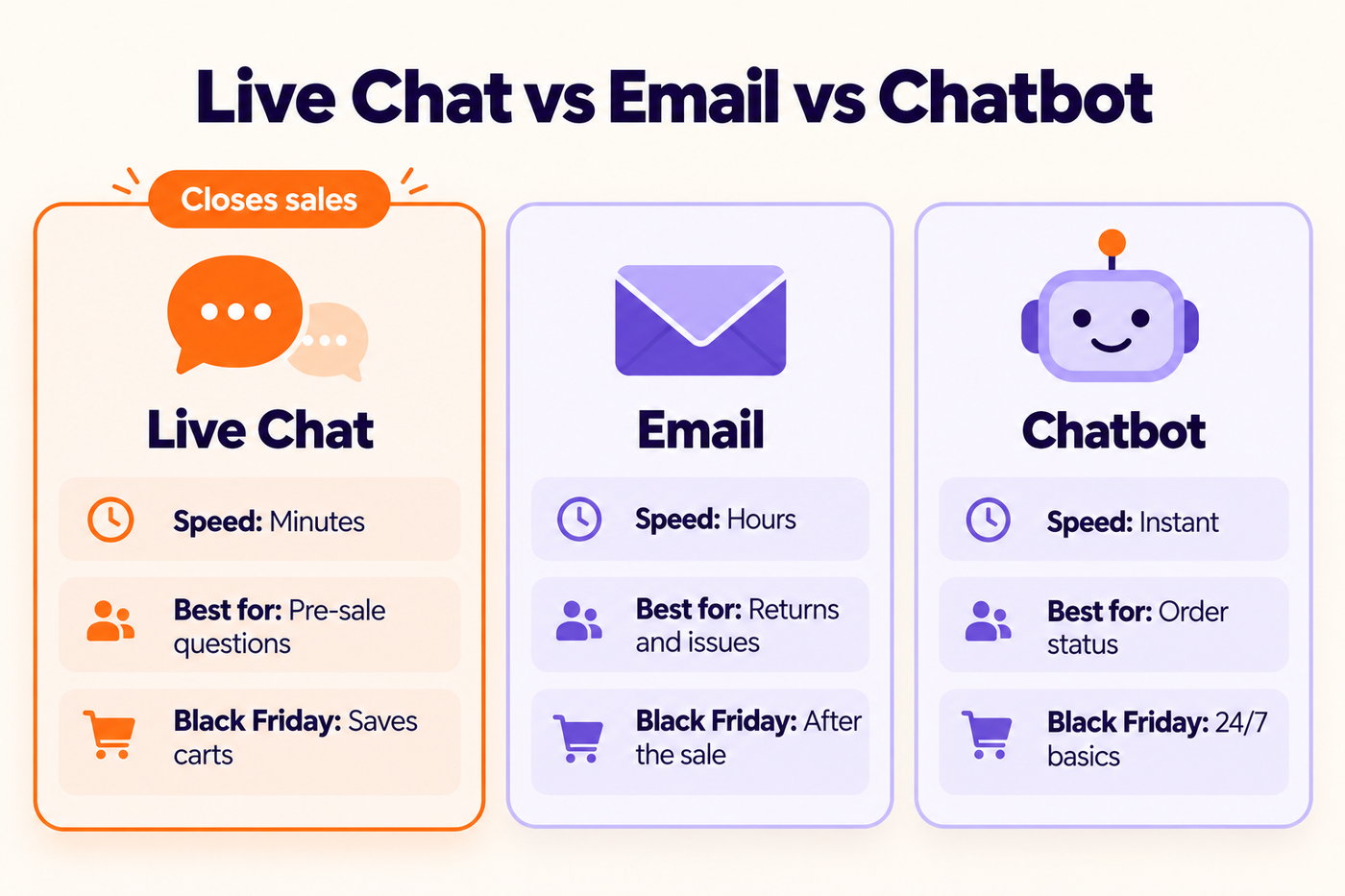
You don’t actually have to choose. Each one’s good at different things, and they work best together.
A real person on chat is where sales happen. Sizing, “which of these two is better,” anything where a bit of warmth helps someone feel okay about spending money. That’s where people really shine.
Email suits the slower, messier stuff. A parcel showed up crushed. Somebody wants to return half an order. The warehouse needs to look into something. Those need photos and a bit of back and forth, and that’s fine.
Bots are brilliant at the boring, repeated questions. “Where’s my order?” “How long does shipping take?” “What’s your return window?” They answer instantly, at 3 a.m., without complaining. The catch is that they get really annoying, really fast, when someone needs a human and can’t reach one.
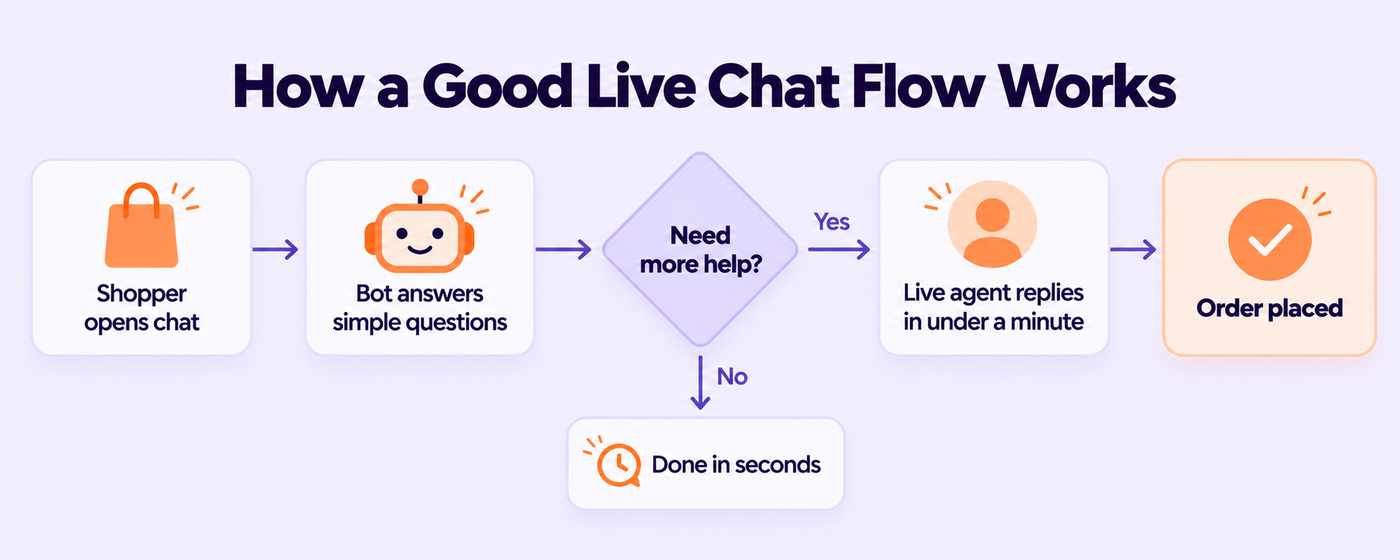
So for Black Friday, what we’d go for is a bot that clears the easy stuff in seconds and passes everything else to a real person inside a minute or two.
How to Set Up Live Chat Support on Shopify
1. Pick Your Ecommerce Live Chat Software
You’ve got loads of choices here. Shopify Inbox is free and comes built in, and for a smaller store it does the job. Brands that are growing tend to land on something like Gorgias, Zendesk, Richpanel, Tidio or Intercom. Most of those pull your Shopify order details right into the chat, so whoever’s answering can see exactly what the customer bought.
For Black Friday specifically, we’d care about four things. It has to hook into Shopify, so nobody’s flipping between tabs to find an order. It has to work properly on phones, because that’s where most of your shoppers are. You want a simple bot option that hands off to a person without a fight. And ideally chat, email and social messages all land in the same inbox.
Already using a helpdesk for email? Use its chat as well. One inbox is so much easier than three. If yours needs sorting out first, our Zendesk and Gorgias setup team can get it running before the sale.
2. Put Chat Where People Make Decisions
Chat doesn’t need to be shoved in people’s faces on every single page. What really counts are your product pages, the cart, checkout, and the order tracking page.
You can set chat to open up on its own in certain spots, too. Say someone’s been sitting on the cart page for over a minute. A small message like “Need a hand with sizing or shipping?” can pop up. Just go easy with this. If the chat window leaps out at people everywhere they go, they’ll just close it and stop noticing it.
3. Set Clear Hours (or Go 24/7)
If you’re not covering chat around the clock, be upfront about it. Put your hours right in the chat window, and when nobody’s on, switch it over to a “leave us a message and we’ll email you” form. There’s nothing worse than a chat that looks live and then never answers.
4. Give Agents What They Need
Whoever’s on chat that week needs a few things in front of them before Friday. The offer rules, written in plain English. Your shipping cut-off dates. The return policy. Sizing notes for your bestsellers. And a short, clear list of what to pass up to someone senior.
Saved replies help a ton here, too. There are templates you can tweak for chat in our post on Black Friday customer service macros.
How Fast Should You Reply on Live Chat?
People pick chat because they want a quick answer. That’s kind of the whole deal. For most Shopify stores, getting back to someone within about a minute is a good target, especially in the middle of a sale.
Can’t manage that with the people you’ve got on Black Friday? Then cut your chat hours down and staff those hours properly. Trust us, that beats leaving chat open all day and replying fifteen minutes later to people who’ve already left.
Keep an eye on missed chats while you’re at it. That’s the number of people who got fed up waiting and bailed. If it starts creeping up during the sale, it’s a pretty clear sign you need more hands.
Live Chat Scripts You Can Use This Black Friday
If you’ve ever wondered how to live chat without sounding like a robot reading a script, the secret’s pretty simple. Short. Friendly. Specific. A few to steal and change up:
Greeting
Hey! I’m [Name] from [Store]. Looking for anything in particular today?
Sizing question
Good question. That one runs a little small, so most people go one size up. If you’re between sizes, I’d go with the [larger size]. Happy to check anything else!
Discount code not working
Let me take a look. [Code] works on full-price items and can’t be combined with other codes. Could you tell me what’s in your cart? I’ll figure out the best price for you.
“Will it arrive before Christmas?”
If you order by [date] with standard shipping, it should arrive in time. For anything after that, express shipping is your safest bet.
Cart hesitation
Just so you know, the Black Friday price ends tonight at midnight [time zone]. Want me to double-check anything before you check out?
Handing off to email
This one needs a quick look from our warehouse team. I’ve passed it on, and you’ll get an email from us by [time]. Thanks for your patience!
What to Automate and What to Keep Human
A bot can take a surprising amount off your team’s plate. You just have to be a bit thoughtful about what you let it handle.
We’d happily hand a bot the order status question (with the tracking link pulled straight from Shopify), shipping times and holiday cut-offs, the return window and how to kick off a return, and your opening hours.
What we wouldn’t let a bot near: sizing and fit, “which one should I get,” anyone who’s already annoyed, payment problems, and frankly anything it’s managed to get wrong twice. And please, always make “talk to a person” easy to find.
One more thing if you’re using AI for chat. Read through what it’s telling people, regularly. A bot confidently getting your return policy wrong on Black Friday is a great way to fill your inbox with angry emails come January.
Covering Nights, Weekends and Other Time Zones
Sell into the US, the UK, Canada and Australia, and somebody, somewhere, is always shopping. Black Friday just makes that painfully obvious, with orders coming in late at night and big bumps over the weekend.
For most small teams, covering chat 24/7 alone just isn’t realistic. So you’ve got two options, really. Keep chat to your busiest hours and let a contact form catch everyone else, or get some help in for evenings and weekends.
Outsourced Live Chat Support: Is It Worth It?
For loads of Shopify brands, yeah, it is, especially around peak season. A team that handles outsourced live chat support can take the hours your people can’t, soak up the extra chats from Black Friday through the holidays, and then shrink back down once January calms down.
If you’re shopping around for a live chat support service, here’s what we’d look for. People who’ve actually done ecommerce support, not just general customer service. Folks who already know their way around your helpdesk and Shopify. Coverage in the time zones your customers are in. A proper plan for learning your products and the way your brand talks. And someone reading through chat transcripts regularly to check quality.
That’s pretty much how our outsourced live chat support works. If you’re thinking about help for the whole holiday season and not just chat, our guide on holiday customer service outsourcing goes through the pros, cons and what it costs.
How to Measure Whether Live Chat Is Working
You don’t need a fancy dashboard. Five numbers tell you most of the story.
First response time, which is just how long people wait for that first reply. Missed chats, the folks who gave up. Chat-to-order conversion, so how many chats turned into a sale. CSAT, the quick thumbs-up or star rating at the end. And your top chat topics, meaning what people keep asking about.
That last one is honestly the most useful. If half the chats on Black Friday are about one discount code, something about that code or the banner is confusing people. If tons of people are asking about sizing on one product, your size guide for it needs work. Our QA and CSAT monitoring and analytics and reporting teams can keep track of all this for you.
Black Friday Live Chat Checklist
Chat software connected to Shopify
Chat live on product pages, cart and checkout
Proactive message set up on the cart page
Chat hours shown, with an offline message form
Bot set up for order status and shipping questions, with easy handoff to a person
Offer rules, shipping cut-offs and return policy shared with agents
Saved replies ready for common questions
Enough people scheduled for peak hours, including evenings and weekends
Missed chats and response time tracked during the sale
Chat topics reviewed after the sale
Frequently Asked Questions
What is ecommerce live chat?
It’s that chat window on an online store where you can ask something and get an answer right away, either from a person, a bot, or a mix.
Does live chat increase sales?
Usually it does help, because people get answers while they’re still making up their mind. A quick reply about sizing, shipping or a code that isn’t working can be the thing that stops someone abandoning their cart.
What’s the best live chat software for Shopify?
Shopify Inbox is free and easy if you’re small. As stores grow, a lot of them move to Gorgias, Zendesk, Richpanel, Tidio or Intercom, mostly because those pull in Shopify order info and keep chat, email and social in one place.
How fast should live chat support respond?
Aim for about a minute, especially in a busy sale. If that’s not doable, it’s better to shorten your chat hours than to keep people waiting.
Should I use a chatbot or a person for live chat?
Ideally both. Let the bot take simple stuff like order status, and get sizing, product and problem questions over to a person fast.
Can I outsource ecommerce live chat support?
You can, and plenty of Shopify brands do, usually to cover evenings, weekends and the holiday rush, often right inside the helpdesk they already use. Our ecommerce customer service page explains how we do it.
Make Every Black Friday Chat Count
Live chat is one of the easiest ways to hang on to sales over Black Friday. The one condition is that someone’s actually there to reply. Put it where people decide, keep your answers quick and human, and let the bot deal with the dull stuff.
Want a team covering chat for the sale? Have a look at our live chat support and Black Friday support pages, start with a 15-day free pilot, or just message us on WhatsApp.

Recommended for you

Gorgias vs Zendesk for Shopify: Which Helpdesk Wins in 2026?

Shopify Conversion Rate Optimization for Black Friday: How to Turn More Visitors Into Buyers (2026)

Black Friday Facebook Ads for Shopify: A Meta and Google Ads Plan That Works (2026)