
Shopify Conversion Rate Optimization for Black Friday: How to Turn More Visitors Into Buyers (2026)

Executive Summary
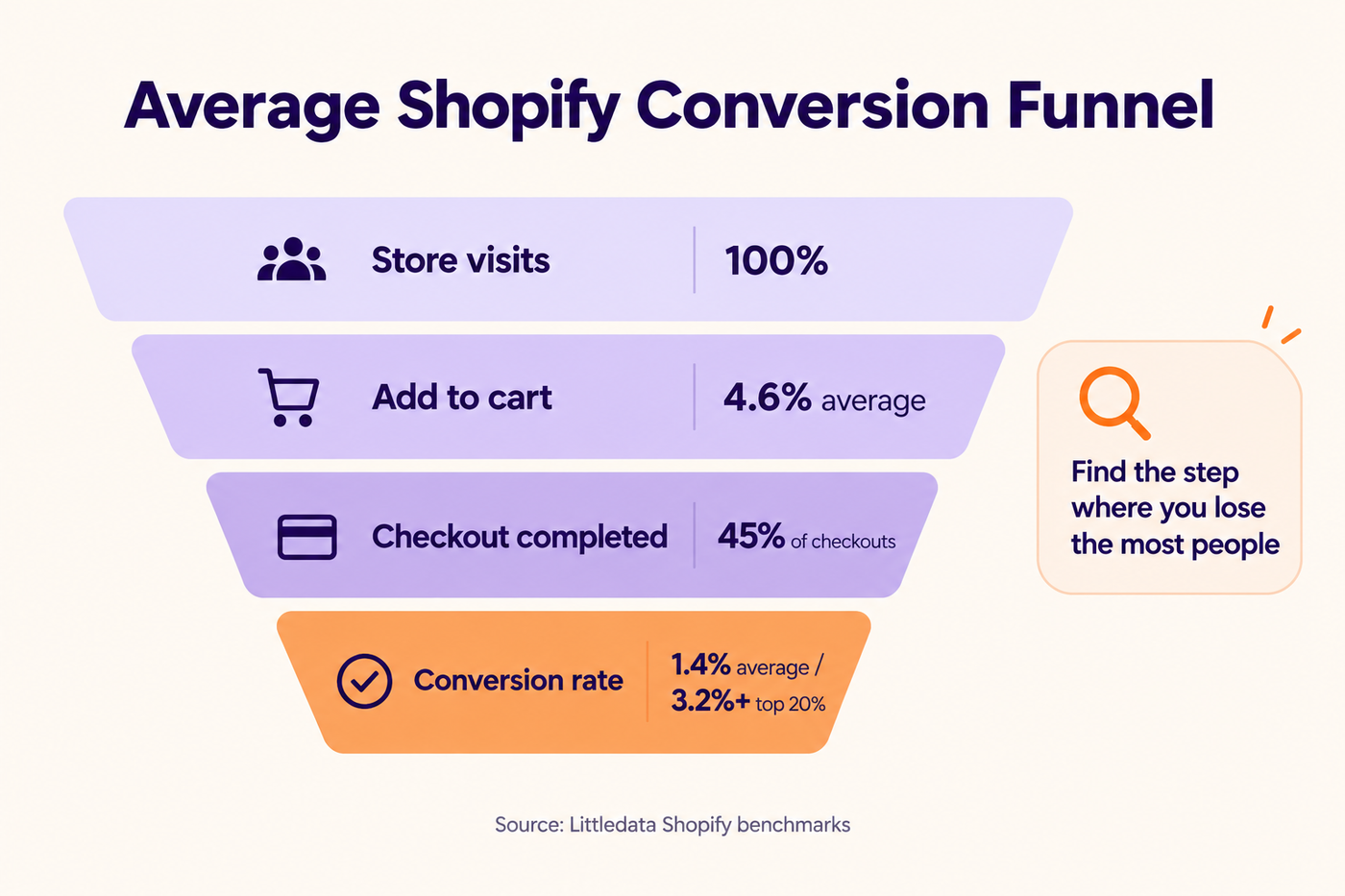
- Your Shopify conversion rate is orders divided by sessions. Littledata’s benchmark puts the average Shopify store at about 1.4%, with the top 20% at 3.2% or more.
- Black Friday traffic is expensive, so even a small lift in conversion can be worth more than extra ad spend.
- Start with the biggest leaks: a clear Black Friday landing page, fast mobile product pages, honest shipping info, simple discounts and a smooth checkout.
- Make changes early, test them on a real phone, and freeze your store about a week before the sale.
Quick bit of back-of-the-napkin maths. Imagine your store pulls in 20,000 visits over Black Friday weekend and converts at 1.5%. That’s 300 orders. Now say you get that up to 2%. Suddenly it’s 400. Same visitors. Same ad bill. A hundred extra orders that basically came out of nowhere.
That’s the reason we keep telling Shopify founders that conversion rate work is probably the best use of the next five weeks. Getting people to your store in November is going to be pricey. Getting more of the ones who show up to actually buy? That’s about as cheap as growth gets.
So let’s look at where stores usually lose people, and what we’d fix before November 27.
What Is a Shopify Conversion Rate?
Put simply, it’s how many visits turn into an order. If you want the formula, it’s this:
Conversion rate = (orders ÷ sessions) × 100
Three hundred orders from 20,000 sessions works out to 1.5%. You’ll find it in Shopify Analytics as “online store conversion rate,” and Shopify also splits it into steps for you. How many sessions added something to cart. How many made it to checkout. How many actually finished.
Honestly, those steps are way more useful than the headline number. If loads of people add to cart but hardly anyone finishes, the problem’s probably at checkout or with shipping costs. If barely anyone adds to cart in the first place, it’s your product pages. Two stores can have the exact same conversion rate and need totally different fixes.
What Is a Good Shopify Conversion Rate?
Annoying answer first: it really depends. What you sell, where your visitors come from, whether they’re on a phone or a laptop, it all moves the number.
Still, it helps to have something to compare against. Littledata’s Shopify data puts the average store at roughly 1.4%. The top fifth of stores sit at 3.2% or higher, and the top tenth at 4.7% or more. Another study from Shogun, covering 745 Shopify stores in the first half of 2026, landed on a mean of 2.61% and a median of 1.74%.
Littledata also has the average add-to-cart rate at 4.6% and checkout completion at about 45%. Put your own numbers next to those. Whichever step looks worst is probably where your money’s leaking.
And please don’t freak out if your rate drops a little over Black Friday weekend. When a big chunk of your traffic is people clicking an ad who’ve never heard of you, it’s normal for that to convert lower than your email list. Look at conversion by traffic source before you decide something’s broken.
How to Increase Conversion Rate on Shopify Before Black Friday
1. Build a Proper Black Friday Landing Page
If we had to name the most common mistake we see, it’d be this one. All the ad clicks and all the email clicks get sent straight to the homepage. And the homepage is trying to do about ten things at once.
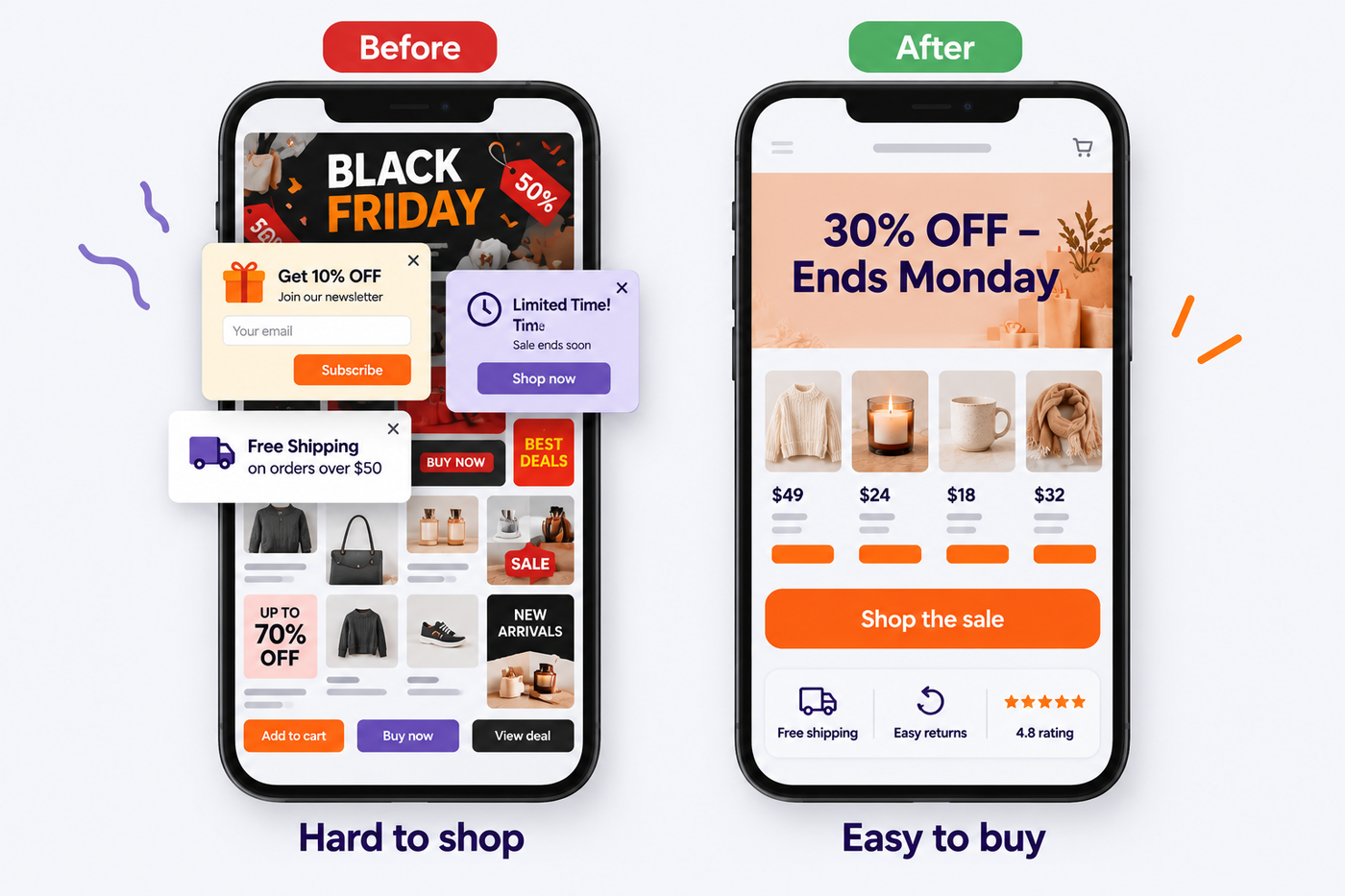
A Black Friday landing page only needs to do one: help someone find a deal and buy it.
At the very top, say what the offer is and when it ends, something like “Up to 30% off everything, ends Monday at midnight.” Right under that, put your bestsellers, not three scrolls down. If you’ve got a big catalog, add a couple of simple filters. Somewhere visible, mention your Christmas shipping cut-offs. Throw in a few reviews or a star rating. And keep the buttons simple, one per product.
That’s honestly about it. The best Black Friday landing pages we’ve worked on look a little plain. They load fast, they’re clear, they’re easy to use with a thumb. That’s exactly why they sell.
2. Fix Your Product Pages on Mobile
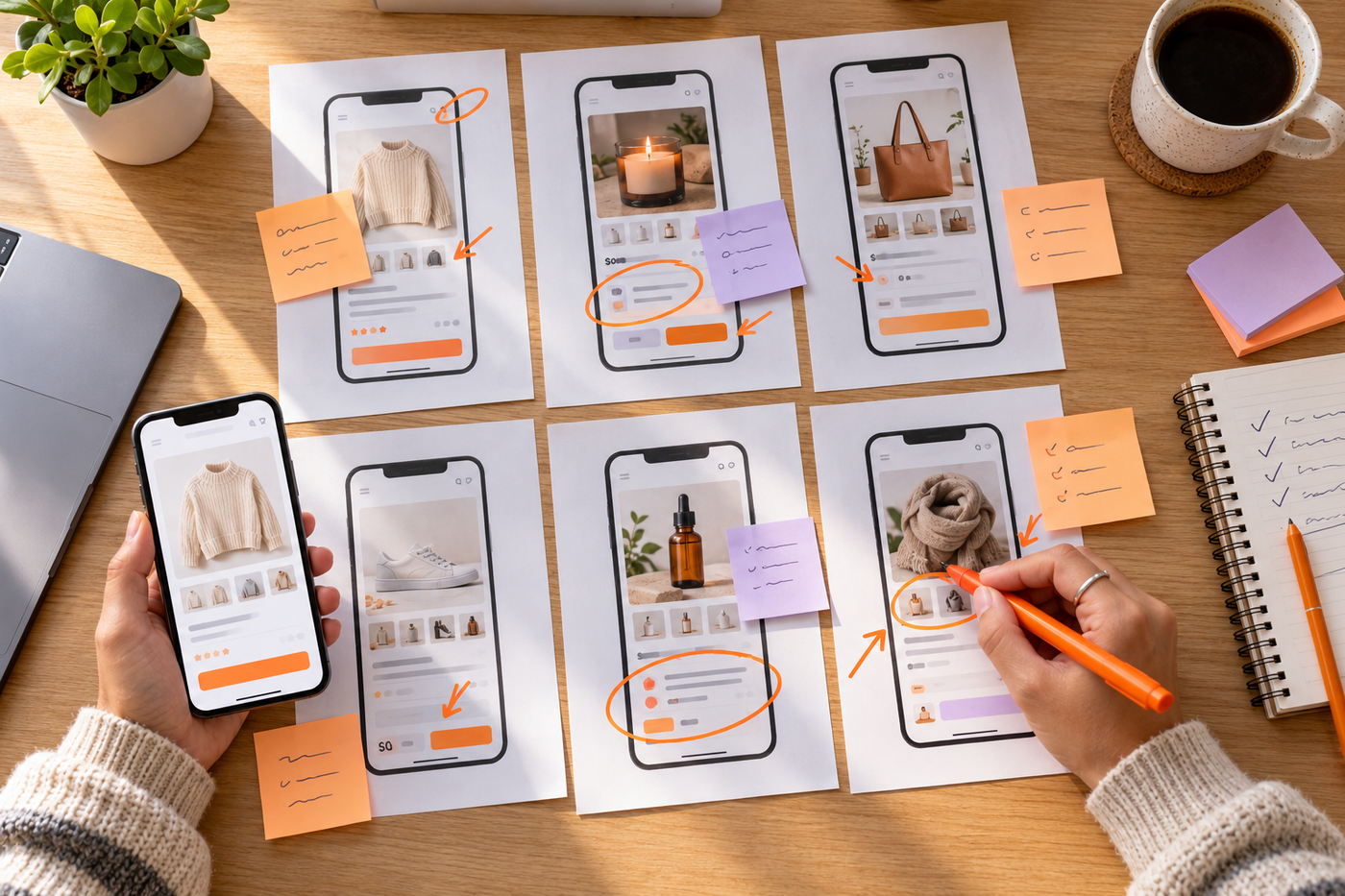
Most of your Black Friday visitors will be on their phones, and mobile almost always converts worse than desktop. So grab your phone, open your five bestselling product pages, and try to look at them like a stranger would.
Can you see the price and the add-to-cart button without scrolling? Do the photos load quickly, even on so-so signal? Is the size guide easy to find? Is it obvious what the sale price is, with the old price crossed out?
Then put the things people worry about right next to the button. When it’ll arrive. How returns work. Whether it runs big or small. Every question you answer right there is one less reason for someone to wander off.
3. Speed Things Up
Slow pages lose people, and on mobile data it’s even worse. You don’t need a perfect speed score. You just need to stop doing the things that slow your store down.
Go through your apps and delete the ones you’re not using. Shrink giant images. Cut back on sliders and pop-ups. Every bit of extra code loads on every single page. Whenever our Shopify store management team looks at a store, we nearly always find three or four apps someone installed once and forgot about.
4. Make Discounts Simple
Complicated offers are conversion killers. “15% off over $75, 20% off over $150, not valid on new arrivals, can’t be combined with...” By the time people finish reading, they’ve lost interest.
If you can, just apply the discount automatically. Nothing to remember, nothing to type, no “why doesn’t this work” at checkout. If you do need codes, test every one of them, and keep the rules short and easy to see.
5. Be Honest About Shipping
Getting surprised by shipping costs at the very last step is one of the biggest reasons people bail on a cart. So show them early. Put the shipping cost or your free-shipping threshold on the product page and in the cart, not just at checkout.
Delivery dates help too. A simple “order by December 18 for Christmas delivery” makes the decision easier, and it cuts down on a lot of “will it get here in time?” messages.
6. Smooth Out the Shopify Checkout
Shopify’s checkout is already pretty well tuned, so there’s not a ton you can change. What you can do is make sure the good bits are actually switched on. Shop Pay, Apple Pay and Google Pay should all be there. The cart should show your return policy and a few trust signals. And during the sale, maybe don’t stuff a bunch of upsell pop-ups between the cart and checkout.
Then do the one thing almost nobody does. Buy something from your own store, on your phone. It sounds silly, but it catches broken codes, weird shipping rates and missing payment options way more often than you’d expect.
7. Use Urgency, But Keep It Honest
Countdown timers, “only 3 left” and “selling fast” can work. As long as they’re true. A timer that starts over every time someone refreshes the page will cost you trust, and shoppers spot it more than you’d think.
The urgency that really works is the real kind. A clear end date for the sale. Stock that’s genuinely running low. Actual shipping deadlines.
8. Add Social Proof Where It Counts
First-time visitors don’t know you yet, so they’re looking for proof. Reviews, star ratings, photos from real customers, “bought by 40 people this week.” Put them on your product pages and your Black Friday landing page, close to the buy button where people are making up their mind.
9. Let Shoppers Ask Questions
Some people just won’t buy until someone answers one little question. Having live chat on product pages and in the cart catches a lot of those. We go into how to set it up in our guide to ecommerce live chat for Black Friday.
10. Recover the Ones Who Leave
Someone abandoning their cart doesn’t mean they’re gone forever. A decent abandoned cart email that mentions the sale and when it ends will bring a fair few of them back. The flows we’d switch on are in our Black Friday email marketing guide.
A Simple Black Friday Landing Page Template
Building one from scratch? Here’s the order we’d lay it out in, top to bottom:
- Banner: the offer, the end date and a single button (“Shop the sale”)
- Bestsellers row: 4 to 8 products with sale prices
- Shop by category: 3 to 6 tiles
- Trust strip: free shipping threshold, easy returns, star rating
- Gift guide or bundles: if you have them
- Shipping cut-offs: Christmas delivery dates
- FAQ: 3 to 5 quick answers (returns, shipping, discount rules)
Keep it short and quick to scroll on a phone. That’s the whole trick.
Shopify Conversion Rate Optimization Tools
You really don’t need a big stack of tools for this.
Start with Shopify Analytics, since it already shows your whole funnel from visits to orders. If you want to actually see what people do on the page, a heatmap and recording tool like Microsoft Clarity (which is free) or Hotjar shows you where they click, how far they scroll and where they get stuck. Google Analytics 4 is handy for comparing conversion by traffic source and landing page.
A/B testing apps are useful too, but here’s the honest bit. You need a decent amount of traffic for test results to mean anything. For most smaller stores, fixing the big, obvious problems beats running lots of tiny tests.
When to Stop Making Changes
Roughly a week before Black Friday, stop touching the store. No new apps. No theme edits. No “quick little tweaks” at 11 p.m. We’ve seen it plenty of times: most of the website problems that happen over Black Friday start with one small last-minute change that broke something else.
Ideally, everything in this guide is done, checked on an actual phone and live by around November 20.
Shopify CRO Checklist for Black Friday
- Black Friday landing page live, with offer and end date at the top
- Ads and emails pointing to the landing page or sale collection, not the homepage
- Top product pages checked on a real phone
- Price, sale price and “Add to cart” visible without scrolling
- Delivery estimate and return policy near the buy button
- Unused apps removed and big images compressed
- Discounts applied automatically, or codes tested and explained simply
- Shipping costs and Christmas cut-offs shown early
- Shop Pay, Apple Pay and Google Pay switched on
- Reviews and ratings on product pages
- Live chat on product pages and cart
- Abandoned cart emails mention the sale
- Test order placed on mobile
- Store frozen one week before the sale
For everything else to get ready, have a look at our Shopify Black Friday checklist.
Frequently Asked Questions
What is a good Shopify conversion rate?
It really depends on what you sell and where your traffic’s from. As a rough guide, Littledata has the average Shopify store at about 1.4%, the top 20% at 3.2% or above, and the top 10% at 4.7% or above.
How do I calculate my Shopify conversion rate?
Take your orders, divide by your sessions, and multiply by 100. Or just check Shopify Analytics, where it shows up as the online store conversion rate.
Why is my Shopify conversion rate so low?
The usual suspects are slow mobile pages, prices or shipping costs that aren’t clear, confusing discounts, not enough reviews, or ads sending people to the homepage. Look at your add-to-cart and checkout numbers to see where people are dropping off.
How can I increase my conversion rate on Shopify quickly?
Make a focused Black Friday landing page, fix your top product pages for phones, show shipping costs early, keep discounts simple and switch on express checkout like Shop Pay.
Does conversion rate drop during Black Friday?
It can, especially if lots of your visitors are new people coming from ads. Compare conversion by traffic source rather than just staring at the overall number.
Should I hire someone for Shopify conversion rate optimization?
If you’re short on time or can’t tell where you’re losing people, getting a CRO review can point you to the biggest fixes fast. That’s what our conversion rate optimization team does for Shopify brands.
More Buyers From the Same Traffic
You don’t have to double your ad budget to have a better Black Friday. Fixing a handful of leaks in your landing page, product pages and checkout can bring in a lot more orders from the people who are already turning up.
Want a hand finding those leaks before the sale? Have a look at our Shopify conversion rate optimization services, start with a 15-day free pilot, or just message us on WhatsApp.
Recommended for you

Gorgias vs Zendesk for Shopify: Which Helpdesk Wins in 2026?

Black Friday Facebook Ads for Shopify: A Meta and Google Ads Plan That Works (2026)

Ecommerce Live Chat Support: How Shopify Stores Turn Black Friday Chats Into Sales (2026)